
The append to string variable action in Power Automate adds text to the end of a String variable. Run it inside Apply to each with concat(item()?['Title'], decodeUriComponent('%0A')), and you build a multi-line list, one line per item.
In this tutorial, we’ll build a text summary in a loop, add line breaks and separators, and see what happens with numbers, objects, and parallel loops. I tested every case in a real flow in October 2026.
What Does Append to String Variable Do?
It takes the current text in a String variable and adds your value to the end. Nothing is replaced. If Summary holds Total: and you append 5, it becomes Total: 5.
Both fields are required: Name picks the variable, and Value is what gets added. Microsoft Learn says the value can have any type. My tests show how each type turns into text.
To replace the text instead, use the action that can set a variable in Power Automate. For numbers, use Increment variable.
How Do You Build a Text Summary Step by Step?
You need a Power Automate account and nothing else. The demo loops over six customer requests stored in an array variable, as in my guide to initialize an array variable with values.
- Go to make.powerautomate.com, select Create > Instant cloud flow, pick Manually trigger a flow, and select Create.
- Add Initialize variable for Requests (Array, six records with Title and City).
- Add another Initialize variable: Name Summary, Type String, Value left empty.
- Add Apply to each and choose the Requests variable.
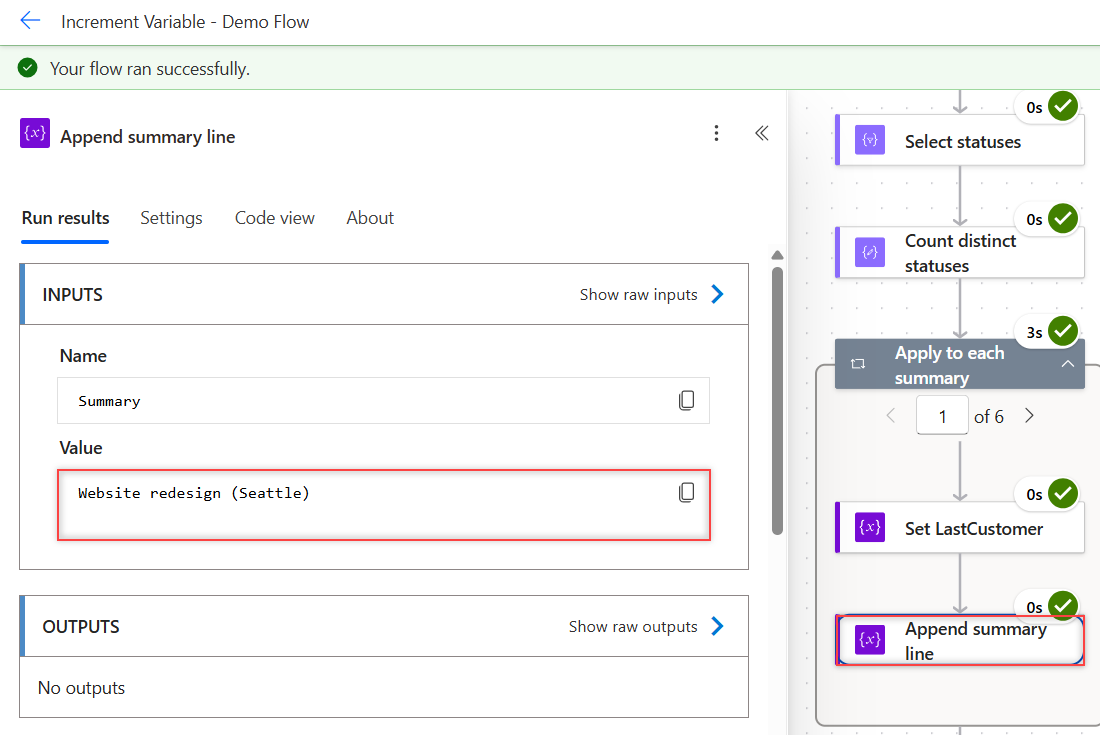
- Inside the loop, select Add an action, search for append to string, and pick Append to string variable.
Choose Summary in Name. In Value, select the fx icon and enter this expression:
concat(item()?['Title'], ' (', item()?['City'], ')', decodeUriComponent('%0A'))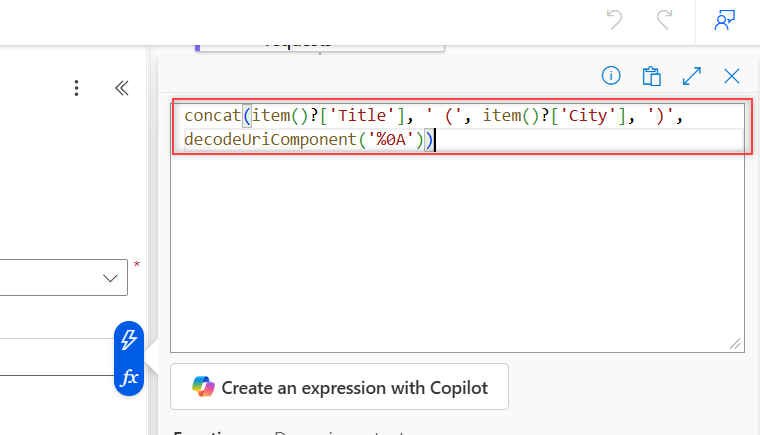
Here’s the action in Code view:
"Append_summary_line": {
  "type": "AppendToStringVariable",
  "inputs": {
    "name": "Summary",
    "value": "@concat(item()?['Title'], ' (', item()?['City'], ')', decodeUriComponent('%0A'))"
  },
  "runAfter": {
    "Set_LastCustomer": ["Succeeded"]
  }
}
What Does the Finished Text Look Like?
After the loop, my Summary variable held six lines. In the raw output, each line break shows as \n:
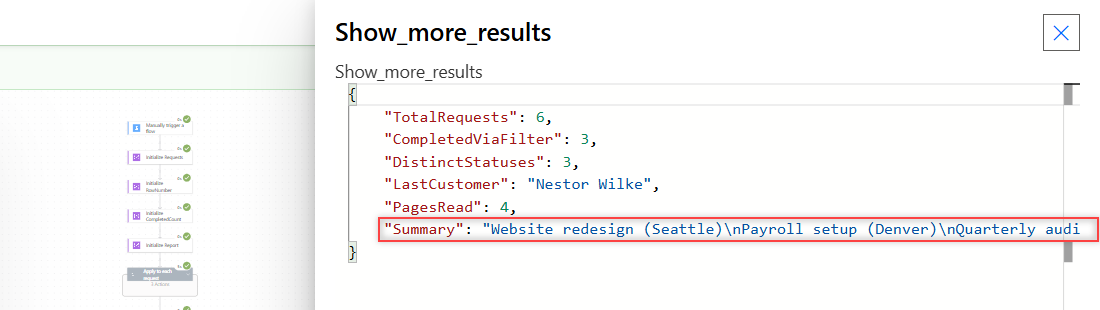
As plain text, it reads like this:
Website redesign (Seattle)
Payroll setup (Denver)
Quarterly audit (Austin)
Laptop refresh (Chicago)
Training plan (Boston)
VPN access (Phoenix)
The value also ends with one last line break. That’s harmless in an email, but trim it if the text goes into a field that cares. You’ll see how in a later section.
How Do You Add a Line Break to a String Variable?
Use decodeUriComponent('%0A'), which returns a line feed character. When I appended it to Seattle, the length went from 7 to 8, so one real character was added.
Typing \n doesn’t work. Appended to Seattle, it gave Seattle\n with a length of 9: a literal backslash and an n. Power Automate has no escape sequences in values.
For HTML emails, append <br> instead of a line feed. For a full layout, build an HTML table in Power Automate.
How Do You Join Items with a Comma and No Trailing Separator?
Appending concat(item(), ', ') for Seattle, Denver, and Austin gave Seattle, Denver, Austin, with an extra comma and space at the end.
Cut the last two characters after the loop with this expression. It returned Seattle, Denver, Austin:
substring(variables('AppList'), 0, sub(length(variables('AppList')), 2))If the list could be empty, check its length first. Often it’s simpler to skip the loop: collect the values in an array and use join(array, ', '), which adds no trailing comma.
Going the other way, from text back to a list, is covered in my guide to creating an array from a string.
What Happens When You Append Numbers, Booleans, or Objects?
Each one became text. Some of the results surprised me:
| Start value | Appended | Result |
|---|---|---|
| Total: | 5 | Total: 5 |
| Done: | true | Done: True (capital T) |
| empty | json('{"City":"Austin"}') | {“City”:”Austin”} |
| empty | createArray('a','b') | [“a”,”b”] |
| x | null | x (nothing added, no error) |
The capital T matters if another step compares the text to true. Wrap that comparison in toLower(), or append the literal text true yourself.
Numbers append fine, but the variable stays text. To do math on it later, see how to convert a string to an integer.
Is Append to String Variable Safe in a Parallel Loop?
Nothing gets lost, but the order does. I appended the numbers 1 to 10 in Apply to each with concurrency at 10. All ten numbers arrived, but in this order:
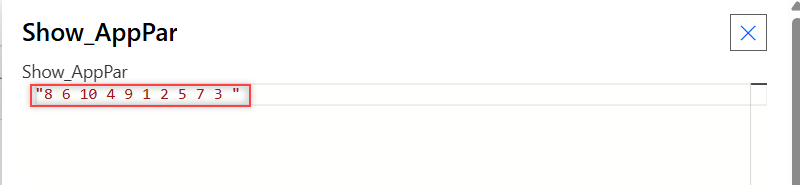
Microsoft Learn says Append to variable might return unpredictable results in parallel loops. Keep the loop sequential, the default, when line order matters, as in my guide to Apply to each on an array variable.
Why Not Use Set Variable with concat()?
A Set variable that uses its own value, like concat(variables('Summary'), 'more'), is refused when you save the flow. Power Automate reports that self reference isn’t supported.
Append to string variable does exactly that job without the error. The same idea applies to numbers, where you increment a variable by 1 instead of setting it.
What Happened in My Tests?
| Test | Result |
|---|---|
| 6 requests with title, city, line feed | 6-line summary |
Append decodeUriComponent('%0A') | Length +1 (real line feed) |
Append typed \n | Literal backslash + n |
| Append with ‘, ‘ in a loop | Trailing ‘, ‘ left over |
| substring() trim | Seattle, Denver, Austin |
Append true | True |
Append null | No change |
| Parallel loop, 10 items | All 10 kept, order mixed |
Append to String Variable: Cheat Sheet
| Goal | How |
|---|---|
| Add text to the end | Append to string variable, Name + Value |
| New line | decodeUriComponent('%0A') |
| HTML line break | <br> |
| Remove trailing ‘, ‘ | substring(v, 0, sub(length(v), 2)) |
| No trailing separator | Array + join(array, ', ') |
| Keep line order | Apply to each concurrency off |
| Replace the text | Set variable |
For more Power Automate patterns, the Power Automate tutorials hub lists every post in order.
Frequently Asked Questions
How do I append to a string variable in Power Automate?
Initialize a String variable, then add the Append to string variable action. Choose the variable in Name and put the text or expression to add in Value.
How do I add a new line when appending text?
Add decodeUriComponent(‘%0A’) at the end of the value, for example with concat(). Typing \n adds a backslash and an n, not a line break.
Can I append a number to a string variable?
Yes. The variables article on Microsoft Learn says the value can be any type. My test turned 5 into the text 5, and true became True.
Why is the order wrong after appending in a loop?
The Apply to each loop is running in parallel. Turn concurrency off in the loop’s Settings so the passes run one at a time.
How do I remove the last comma after appending in a loop?
Use substring(text, 0, sub(length(text), 2)) after the loop, or collect the values in an array and use join() instead.
More Power Automate Tutorials
Here are a few more posts to try next:
- the Power Automate Do until loop
- formatting dates with formatDateTime()
- saving email attachments to SharePoint
- checking for blank values in a condition

Bijay Kumar is a 13-times Microsoft MVP in Business Applications with over 18 years of experience in the IT industry, recognized for his contributions to the Microsoft community. He is the Founder of TSinfo Technologies and shares practical, tested tutorials on Power Apps, Power Automate, Copilot Studio, and Power BI here on Power Platform FAQs. Read more.