
For a Power Automate convert string to integer step, wrap the value in int(), for example int(triggerBody()?['Quantity']). It turns text like '42' into the number 42. It fails on blank text and decimals, so those need a guard.
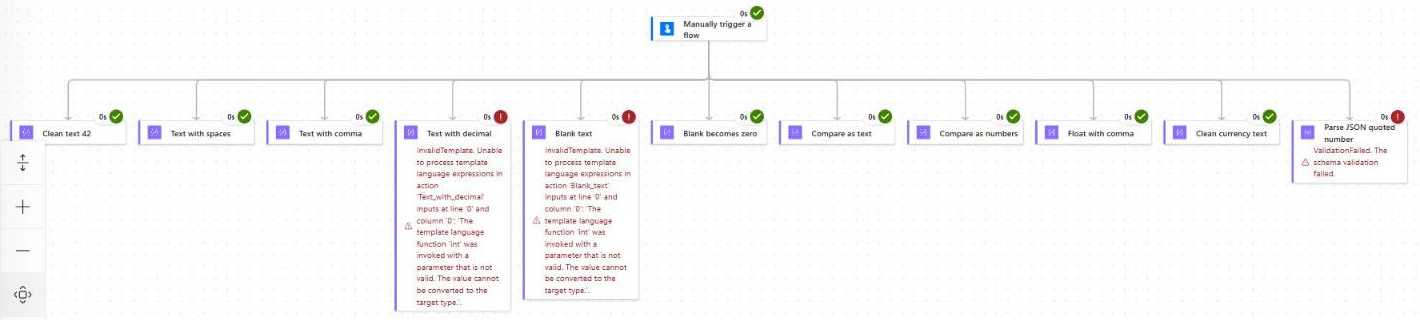
I didn’t want to guess which inputs break it, so I built a test flow with 11 parallel checks and ran it. A few results surprised me, and they change how you should write these expressions.
How Do You Convert a String to an Integer in Power Automate?
Use the int() expression on the text value. In the new designer, you add it through the expression editor in any action input, such as Compose, Initialize variable, or a Condition.
- Open your cloud flow in the new designer and select the action that needs the number.
- Click the input box, then select the fx icon, or type / and choose Insert expression.
- Type
int(, insert the dynamic content for your text value, and close the bracket. - Select Add, save the flow, and test it with real values.
int(triggerBody()?['Quantity'])Watch out: Don’t type an
@in the expression editor. The designer adds it for you. You only write@yourself in code view or in trigger conditions.
If you also build canvas apps, the same idea applies there with a different function. Here’s how to convert text to a number in Power Apps.
What Does int() Accept? My Test Results
Every row below came from one manual run of my test flow. Each check sat in its own parallel branch, so one failure didn’t stop the others. Here’s exactly what happened:
| Input | Expression | Result |
|---|---|---|
| Clean text | int('42') | 42 |
| Spaces around the number | int(' 42 ') | 42 |
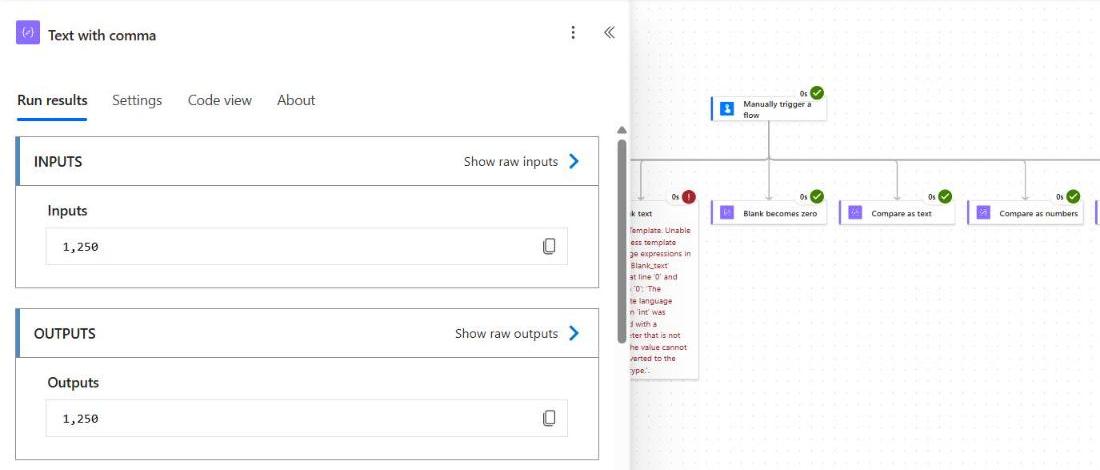
| Thousands comma | int('1,250') | 1250 |
| Decimal text | int('12.5') | Failed (InvalidTemplate) |
| Blank text | int('') | Failed (InvalidTemplate) |
| Blank with a guard | if(empty(''), 0, int('')) | 0 |
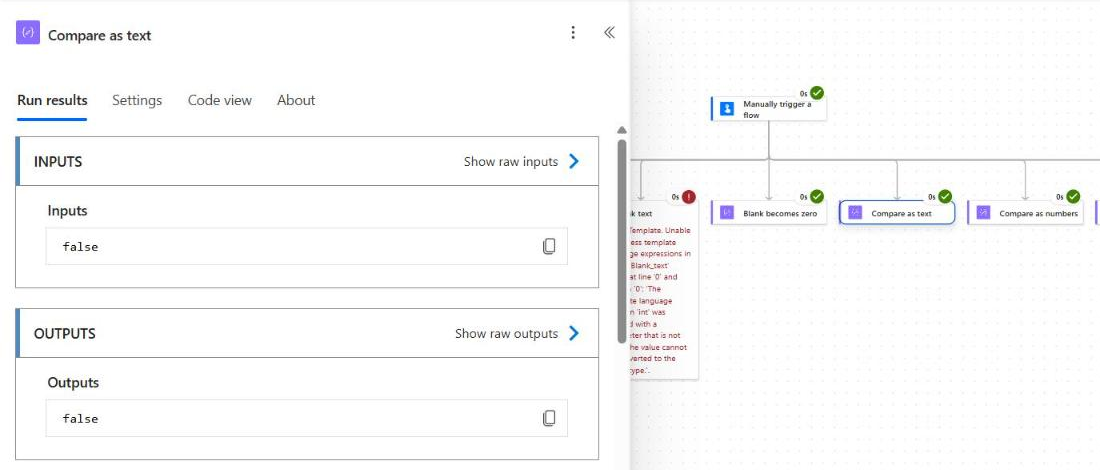
| Text compared as text | greater('100', '20') | false |
| Text compared as numbers | greater(int('100'), int('20')) | true |
| Decimal with comma | float('1,250.75') | 1250.75 |
| Currency text, cleaned | decimal(replace(replace(trim(' $1,250.75 '), '$', ''), ',', '')) | 1250.75 |
| Quoted number in Parse JSON | Schema type integer, value "42" | Failed (ValidationFailed) |
The two surprises were spaces and commas. I expected both to fail, but int() trimmed the spaces and accepted '1,250' as 1250. You don’t need trim() or replace() for those two cases.
Both failures returned the same error text. When you see it, check the input value in run history first:
The template language function 'int' was invoked with a parameter that is not valid. The value cannot be converted to the target type.Before you build approvals or totals on top of a converted value, it’s worth knowing how actions and expressions fit together in a flow.
How Do You Convert Decimal Text Like ‘12.5’?
Use float() or decimal() instead of int(). In my run, int('12.5') failed, while float('1,250.75') returned 1250.75 and handled the comma too.
float('1,250.75')Pick decimal() for money. Microsoft says it keeps .NET decimal precision, and you should wrap the result in string() when you need to keep every digit in text.
Don’t round silently to force a whole number. If a decimal quantity is invalid for your process, send the item to a review path instead. That’s the same pattern I use when checking for blank values with a Power Automate condition.
How Do You Handle Blank or Null Values Before int()?
Wrap the conversion in if(empty(...)). My test proved that if() only runs the branch it picks: if(empty(''), 0, int('')) returned 0 even though int('') on its own failed.
if(empty(triggerBody()?['Quantity']), 0, int(triggerBody()?['Quantity']))Return 0 only when blank really means zero, like an optional discount. For a missing invoice amount, return null instead, or stop the flow, so nobody mistakes missing data for a real zero.
if(empty(triggerBody()?['Quantity']), null, int(triggerBody()?['Quantity']))Why Does a Condition Compare Numbers Wrong?
Because text is compared like words, not amounts. In my run, greater('100', '20') returned false, since the text “1” sorts before “2”. Converting both sides gave the right answer, true.
greater(int(triggerBody()?['Score']), int(triggerBody()?['MinimumScore']))If the flow shouldn’t start at all unless the number passes a rule, move the check out of the flow and into Power Automate trigger conditions.
How Do You Convert Currency Text Like ‘$1,250.75’?
Remove the dollar sign and the comma, trim the spaces, then use decimal(). This exact expression returned 1250.75 in my test:
decimal(replace(replace(trim(' $1,250.75 '), '$', ''), ',', ''))Keep the number and the display text separate. formatNumber() returns text, so use it only for emails and messages, never as input for math. The same rule applies when you format dates with formatDateTime().
Why Does Parse JSON Fail on a Quoted Number?
Parse JSON checks types, and it doesn’t convert them. My payload had "quantity": "42" and the schema said integer, so the action failed with ValidationFailed.
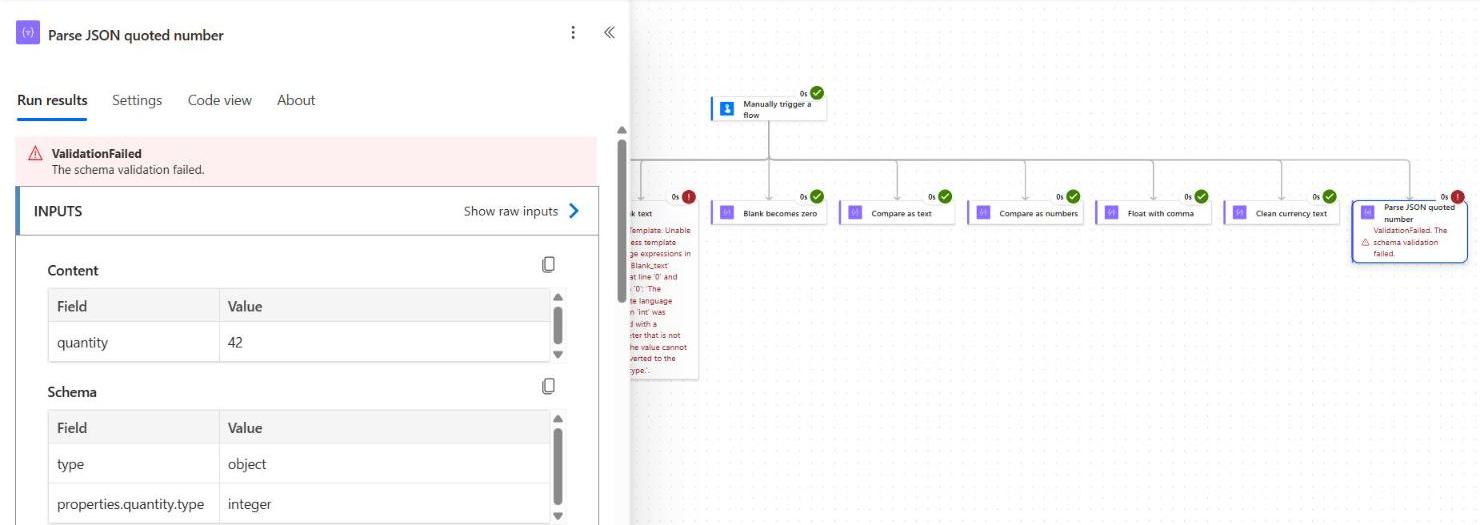
You have two clean fixes. Send the number without quotes if you control the payload, or change the schema type to string and convert it with int() in a later action.
How Do You Use the Integer in Variables and Loops?
Convert once, then store the result in an Integer variable. In Initialize variable, set Type to Integer and put the guarded expression in Value:
if(empty(triggerBody()?['Quantity']), 0, int(triggerBody()?['Quantity']))To total text values in an Apply to each, convert each item as you add it. Keep the loop’s concurrency off so updates to the same variable happen in order:
add(variables('varTotal'), int(items('Apply_to_each')?['Quantity']))If you also stamp the run date in a variable, see how to set a variable to today’s date.
Power Automate Convert String to Integer Cheat Sheet
Swap the property names for your own dynamic content. Every pattern here matches a result from my test run.
| Need | Expression |
|---|---|
| Text to integer | int(triggerBody()?['Quantity']) |
| Blank becomes 0 | if(empty(x), 0, int(x)) |
| Blank stays null | if(empty(x), null, int(x)) |
| Decimal text | float(x) or decimal(x) |
| Currency text | decimal(replace(replace(trim(x), '$', ''), ',', '')) |
| Compare as numbers | greater(int(a), int(b)) |
| Number back to text | string(variables('varTotal')) |
Frequently Asked Questions
How do I convert a string to an integer in Power Automate?
Use int(), for example int(triggerBody()?['Quantity']). It works on whole-number text, including values with surrounding spaces or a thousands comma.
Why does int(‘12.5’) fail in Power Automate?
int() only accepts whole numbers, so decimal text fails with an InvalidTemplate error. Use float() or decimal() for values with a fractional part.
How do I convert a blank value without an error?
Use if(empty(x), 0, int(x)). The if() function only evaluates the branch it returns, so int() never runs on the blank value.
Does float() accept commas in Power Automate?
Yes. float('1,250.75') returns 1250.75, and Microsoft documents a locale option for other formats in the workflow expression functions reference.
Why does my Condition say 100 is not greater than 20?
Both values are still text, so they’re compared like words. Convert both sides with int() before you compare them.
More Power Automate Tutorials
Working with numbers usually means working with dates and branching too. These are the next ones I’d read:
- adding days to a date with addDays()
- formatting dates with ordinal suffixes
- Power Apps vs Power Automate: when to use each
- writing multiple If statements in Power Apps

Bijay Kumar is a Microsoft MVP in Business Applications with over 18 years of experience in the IT industry and more than 12 years as a Microsoft MVP, recognized for his contributions to the Microsoft community. He is the Founder of TSinfo Technologies and the creator of the popular technology platforms SPGuides.com and EnjoySharePoint.com. Bijay also runs the SPGuides YouTube channel, where he shares practical tutorials on Microsoft 365, SharePoint, Power Platform, and Copilot technologies. Read more.