
To count items in array values in Power Automate, use length(). length(variables('Requests')) returns 6 for a six-item array. To count only matching items, run a Filter array first and take the length of its output.
In this tutorial, we’ll count all items, matching items, distinct values, and items that don’t match, and compare that with a loop counter. I ran every expression in a real flow in October 2026.
What Sample Data Does This Tutorial Use?
Six customer requests in an Array variable named Requests. Three are Completed, two are In Progress, and one is New:
[
  { "Title": "Website redesign", "Customer": "Megan Bowen", "City": "Seattle", "Status": "Completed" },
  { "Title": "Payroll setup", "Customer": "Alex Wilber", "City": "Denver", "Status": "In Progress" },
  { "Title": "Quarterly audit", "Customer": "Adele Vance", "City": "Austin", "Status": "Completed" },
  { "Title": "Laptop refresh", "Customer": "Lee Gu", "City": "Chicago", "Status": "New" },
  { "Title": "Training plan", "Customer": "Diego Siciliani", "City": "Boston", "Status": "Completed" },
  { "Title": "VPN access", "Customer": "Nestor Wilke", "City": "Phoenix", "Status": "In Progress" }
]
You can paste this into an Initialize variable action with Type set to Array. My guide on how to initialize an array variable with values shows each step.
Method 1: How Do You Count All Items with length()?
Add a Compose action. In Inputs, select the fx icon and enter:
length(variables('Requests'))It returned 6. length() works on any array: a variable, a Get items value array, a split() result, or the body of a Filter array. An empty array, json('[]'), returned 0.
length() also counts characters in text. length('Seattle') returned 7, so make sure you pass the array, not a text version of it. To build arrays first, see how to create an array in Power Automate.
Method 2: How Do You Count Items That Match a Condition?
Filter the array, then count what’s left. This is the method I use most, because it needs no loop.
- Add a Filter array action named Filter completed requests.
- In From, pick the Requests variable.
- In the filter row, set the left side to the expression
item()?['Status'], choose is equal to, and type Completed.
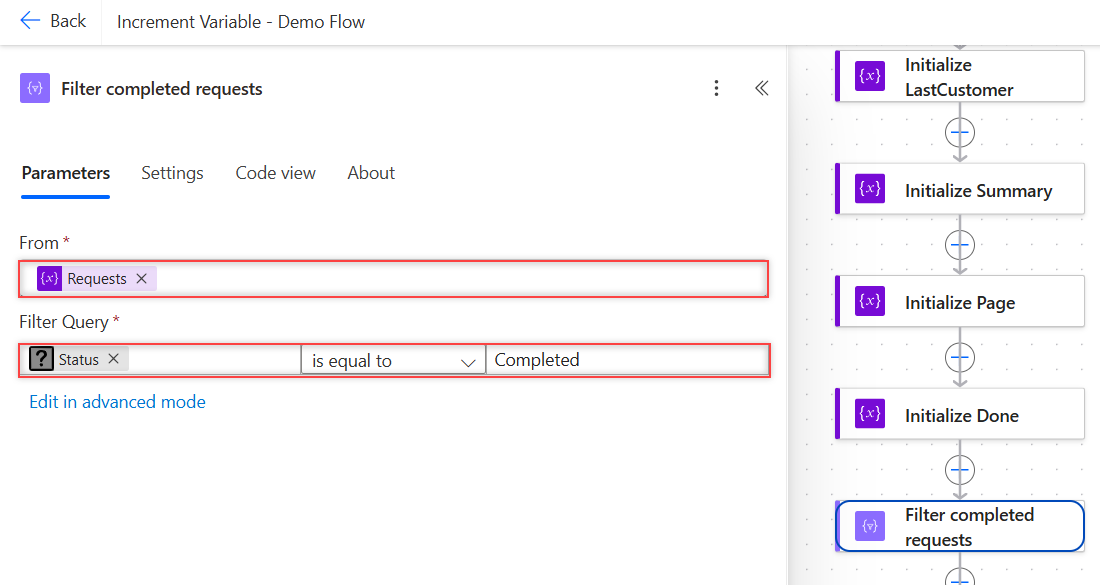
Add a Compose under it named Count completed with this expression:
length(body('Filter_completed_requests'))It returned 3. Here’s the Filter array in Code view:
"Filter_completed_requests": {
  "type": "Query",
  "inputs": {
    "from": "@variables('Requests')",
    "where": "@equals(item()?['Status'], 'Completed')"
  }
}
The comparison is case-sensitive. Filtering on completed in lowercase returned 0. If your data might vary, compare toLower(item()?['Status']) with a lowercase value.
Method 3: How Do You Count Items That Don’t Match?
Switch to advanced mode in the Filter array and wrap the test in not():
@not(equals(item()?['Status'], 'Completed'))The length of that output was 3: two In Progress and one New. You can also subtract: total minus Completed gives the same number without a second filter.
Blank values can slip through filters like this. My post on the Power Automate condition if blank shows how to catch them.
Method 4: How Do You Count Distinct Values?
First pull out the one field you care about with a Select action. Set From to Requests, switch Map to text mode, and enter item()?['Status'].
That gave a plain list of six statuses. Then pass it to union() twice, which removes duplicates, and count the result:
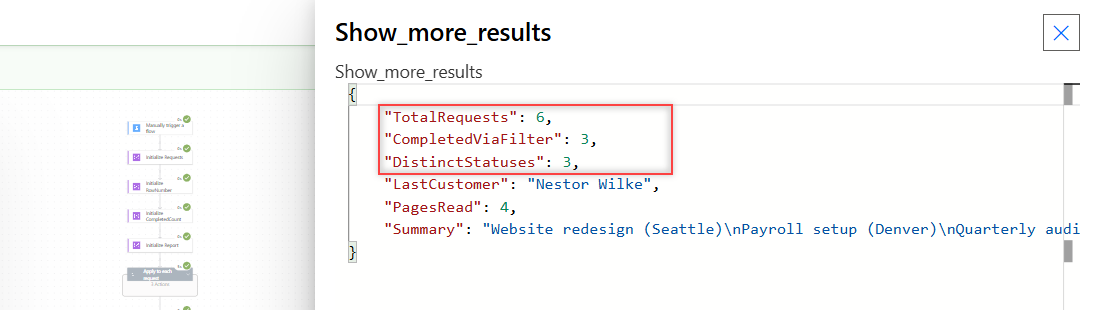
length(union(body('Select_statuses'), body('Select_statuses')))It returned 3: Completed, In Progress, and New. My demo flow’s final Compose showed all three counts side by side:
Method 5: How Do You Count with a Loop Counter?
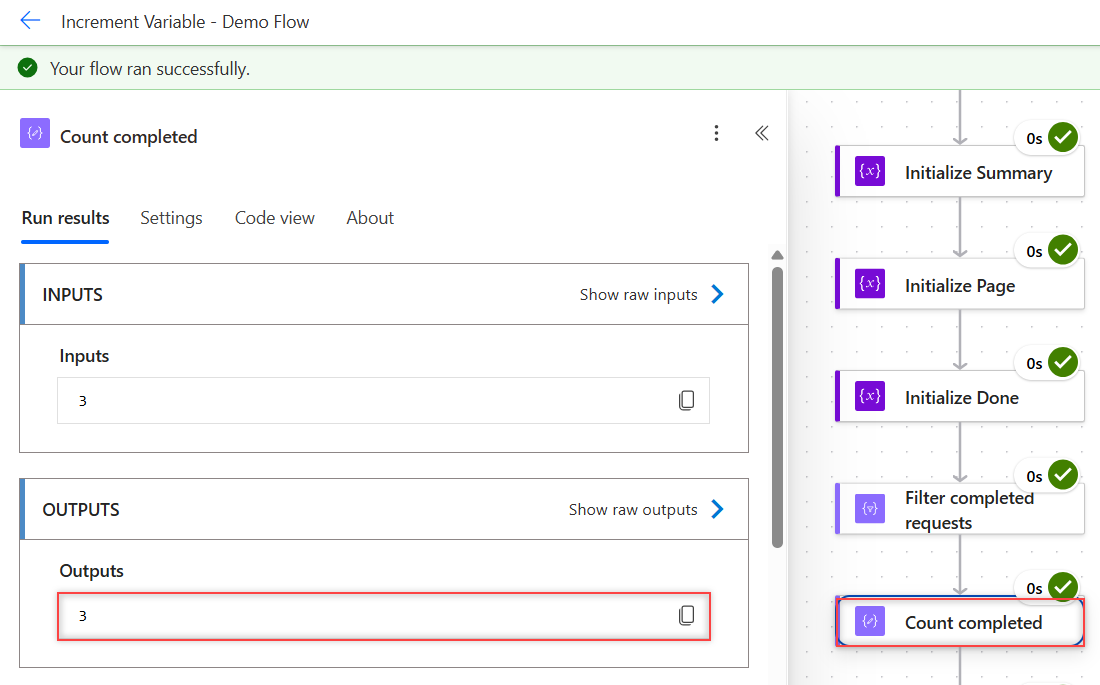
Initialize an Integer at 0, loop over the array with Apply to each, and add a Condition. In its True branch, use Increment variable. My counter for Completed requests ended at 3, the same as Filter array.
It works, but it’s slower, because every item is a loop pass. I use it only when I’m already looping for another reason. The full setup is in my guide on how to increment a variable by 1.
If you do loop, keep it sequential when other variables change inside it, as explained in my guide to Apply to each on an array variable.
How Do You Count Items in a Comma-Separated String?
Split it into an array, then use length():
length(split('Completed,New,Completed', ','))It returned 3. To count how often one word appears in text, split on that word and subtract 1. On the six statuses joined with a pipe, this returned 3:
sub(length(split(join(body('Select_statuses'), '|'), 'Completed')), 1)Careful: that trick also counts the word inside longer words. For clean data, Filter array is safer. For more split() behavior, see creating an array from a string.
Why Does length() Fail?
length() only accepts an array or a string. Passing null failed the action with this error:
Unable to process template language expressions in action 'Count_null' inputs at line '0' and column '0': 'The template language function 'length' expects its parameter to be an array or a string. The provided value is of type 'Null'.Passing an object, like json('{"a":1,"b":2}'), failed with the same message. That happens when you pass a whole response body instead of its array, such as the body of an HTTP or Get items call.
Point length() at the array inside, like body('Get_items')?['value'], and use coalesce(x, json('[]')) when the value might be missing. My guide to creating an array of objects covers that structure.
What Happened in My Tests?
| Expression | Result |
|---|---|
length(variables('Requests')) | 6 |
| Filter Status = Completed, then length() | 3 |
| Filter Status = completed (lowercase) | 0 |
| Filter not Completed, then length() | 3 |
| Distinct statuses with union() | 3 |
| Loop + Condition + Increment | 3 |
length(json('[]')) | 0 |
length('Seattle') | 7 (characters) |
length(null) | Failed: type ‘Null’ |
length(object) | Failed: expects array or string |
Count Items in Array: Cheat Sheet
| Goal | Use |
|---|---|
| All items | length(array) |
| Matching items | Filter array, then length(body('Filter_array')) |
| Non-matching items | Filter with not(...), or total minus matches |
| Distinct values | Select + length(union(x, x)) |
| Items in a text list | length(split(text, ',')) |
| Value might be missing | length(coalesce(x, json('[]'))) |
| Already looping | Condition + Increment variable |
For more Power Automate patterns, the Power Automate tutorials hub lists every post in order.
Frequently Asked Questions
How do I count items in an array in Power Automate?
Use length() in a Compose action, such as length(variables(‘Requests’)). It returns the number of items, and 0 for an empty array.
How do I count items that match a condition?
Run a Filter array action with your condition, then use length(body(‘Filter_array’)). My six requests returned 3 for Status equal to Completed.
Is there a count() function in Power Automate?
No. Use length(), which the expression functions reference on Microsoft Learn describes as returning the number of items in a collection.
How do I count distinct values in an array?
Select the field you want in text mode, then use length(union(x, x)). union() removes duplicates, so three different statuses returned 3.
Why does length() say it expects an array or a string?
The value is null or an object. Point it at the array inside the object, such as the value property, or use coalesce() for missing values.
More Power Automate Tutorials
Here are a few related posts I’d read next:
- the Power Automate Do until loop
- using the Set variable action
- building an HTML table from an array
- formatting dates with formatDateTime()

Bijay Kumar is a 13-times Microsoft MVP in Business Applications with over 18 years of experience in the IT industry, recognized for his contributions to the Microsoft community. He is the Founder of TSinfo Technologies and shares practical, tested tutorials on Power Apps, Power Automate, Copilot Studio, and Power BI here on Power Platform FAQs. Read more.