
If you’ve tried a Power Automate check if date is less than today and got true for a future date, the comparison is working on text. Use less(formatDateTime(date,'yyyy-MM-dd'), today) instead.
less() compares strings one character at a time, so the date format decides the answer. In this tutorial, I’ll show the Power Automate check if date is less than today patterns that held up in my run on November 9, 2026.
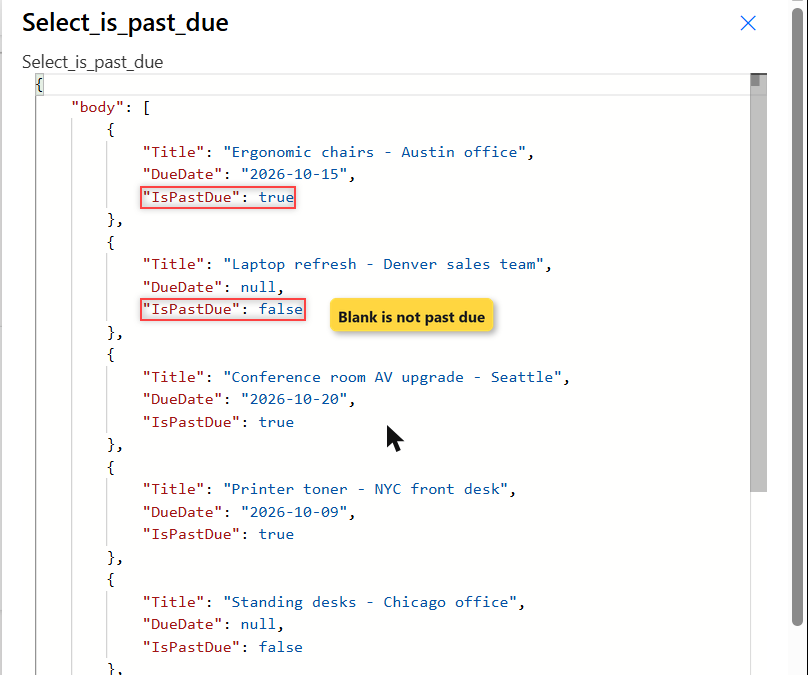
The Sample List We’ll Use
It’s a SharePoint list with a date-only DueDate column. Today’s date lives in a Compose action named Today_Eastern, using convertFromUtc(utcNow(),'Eastern Standard Time','yyyy-MM-dd').
| ID | Title | DueDate |
|---|---|---|
| 1 | Ergonomic chairs – Austin office | 10/15/2026 |
| 2 | Laptop refresh – Denver sales team | blank |
| 3 | Conference room AV upgrade – Seattle | 10/20/2026 |
| 4 | Printer toner – NYC front desk | 10/09/2026 |
| 5 | Standing desks – Chicago office | blank |
| 6 | Badge printer – Boston lobby | 10/21/2026 |
| 7 | Copier lease renewal – Dallas office | 11/09/2026 (today) |
| 8 | Network switch swap – Atlanta office | 11/08/2026 (yesterday) |
| 9 | Desk phones – Phoenix call center | 11/10/2026 (tomorrow) |
| 10 | Safety signage – Miami warehouse | 11/16/2026 |
If you only need rows from SharePoint, a server-side filter for dates less than today is the better choice. This post is about checking a date inside the flow.
Method 1: Compare Formatted Dates With less() (Recommended)
Same list, one row at a time. Add a Condition inside Apply to each, choose is less than, and use this expression on the left:
if(empty(items('Check_each_request')?['DueDate']),'9999-12-31',formatDateTime(items('Check_each_request')?['DueDate'],'yyyy-MM-dd'))Put outputs('Today_Eastern') on the right. Rows 1, 3, 4, 6, and 8 returned true. Row 7, due today, returned false.
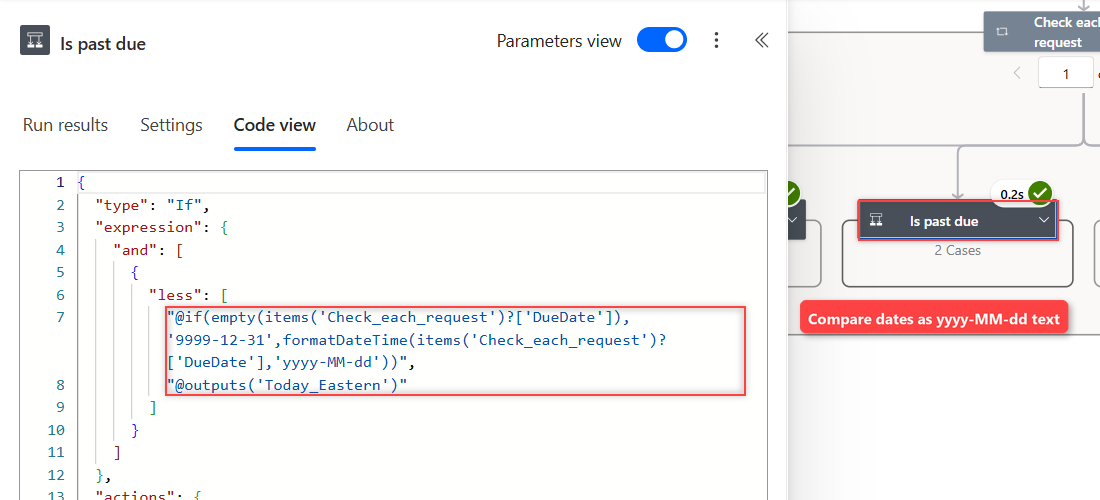
How does this work? In yyyy-MM-dd, the year comes first, so alphabetical order matches date order. 2026-11-08 sorts before 2026-11-09.
Need today to count? lessOrEquals('2026-11-10','2026-11-10') returned true, while less() returned false. Learn how to check if a date is today for that exact case.
Why Does a Future Date Return True?
Here’s the mistake. November 20 is after November 10, yet this returned true:
less('11/20/2026','2026-11-10')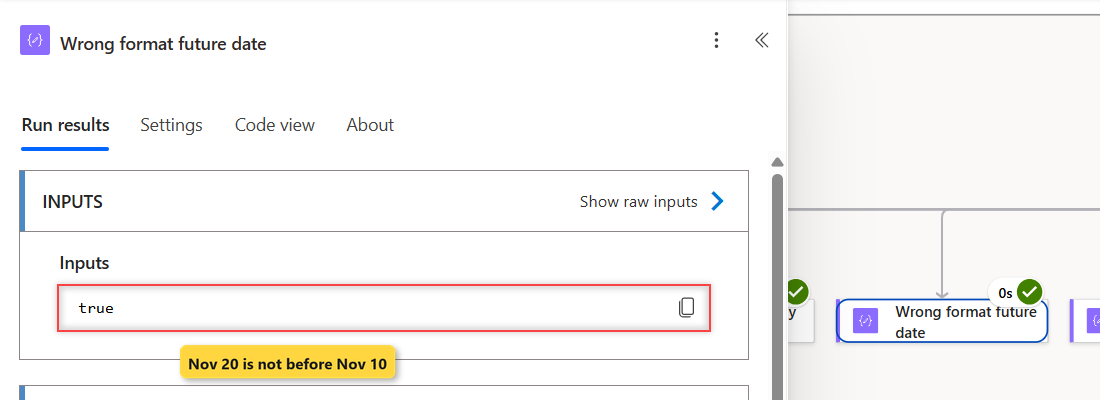
How does this work? The first character of 11/20/2026 is 1, and the first of 2026-11-10 is 2. Text comparison stops there. Formatting first returned the correct false:
less(formatDateTime('11/20/2026','yyyy-MM-dd'),'2026-11-10')Method 2: Compare ticks() Values
Use the same dates here when your two values come in different formats. ticks() turns each one into a number first:
less(ticks('11/20/2026'),ticks('2026-11-10'))It correctly returned false. It’s also a good base for date math, like a date difference in days.
How does this work? Numbers compare by value, so the format stops mattering. Remember that ticks() includes the time, so strip it when you only care about the day.
Watch Out for Timestamps From Today
A date from earlier today is less than utcNow(), because utcNow() includes the current time:
less(utcNow('yyyy-MM-ddT00:00:00Z'),utcNow())That returned true. Compare against the start of the day instead:
less('2026-11-10T15:00:00Z',startOfDay('2026-11-10T20:00:00Z'))It returned false, while the same check on November 9 returned true. Those functions pair nicely with expressions for yesterday’s date.
How Do You Handle a Blank Date?
Don’t let a blank reach less(). Passing null failed with this error:
The template language function 'less' expects two parameter of matching types. The function was invoked with values of type 'Null' and 'String'...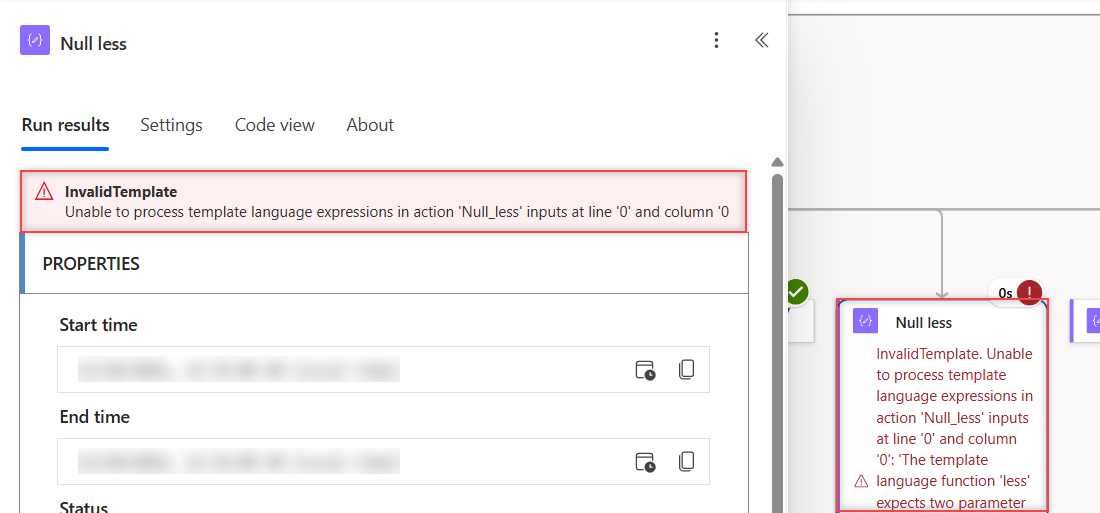
Oddly, less('','2026-11-10') returned true, so empty text looks overdue. Guard it, as covered in how to check if a date field is empty.
Things to Keep in Mind
- Match formats. Use
yyyy-MM-ddon both sides. - Pick a time zone.
utcNow()is UTC, and it can be a day ahead of the US in the evening. - Guard blanks. Decide whether a missing date counts as overdue.
- Filter early. Don’t loop over thousands of rows when a query can do it.
Frequently Asked Questions
How do I check if a date is before today in Power Automate?
Use less(formatDateTime(date,'yyyy-MM-dd'), today), where both sides use the same format.
Why is my date comparison wrong?
less() compares text when you pass strings. The expression functions reference covers ticks() for numeric comparison.
What does the less function do with null?
It fails with an InvalidTemplate error about matching types, so check with empty() first.
Should I use less or lessOrEquals?
Use less for strictly past dates and lessOrEquals when today also counts.
Can I use ticks to compare dates?
Yes. less(ticks(a), ticks(b)) compares numbers and worked with mixed date formats in my test.
More Power Automate Tutorials
Comparing dates usually leads to one of these:
- adding days to a date
- using a condition for blank values
- formatting dates
- writing trigger conditions

Bijay Kumar is a 13-times Microsoft MVP in Business Applications with over 18 years of experience in the IT industry, recognized for his contributions to the Microsoft community. He is the Founder of TSinfo Technologies and shares practical, tested tutorials on Power Apps, Power Automate, Copilot Studio, and Power BI here on Power Platform FAQs. Read more.