
Say a facilities team wants a simple flow: every morning, find the requests due today and remind the owner. For a Power Automate check if date is today, that sounds like a single equals test.
It isn’t. utcNow() carries a time down to the fraction of a second, so comparing it to a date never matches. My first test returned false even though both values described the same day.
Quick answer: Format both sides the same way, then compare: equals(formatDateTime(yourDate,'yyyy-MM-dd'), convertFromUtc(utcNow(),'Eastern Standard Time','yyyy-MM-dd')). Guard blank dates first.
I’ll walk through each Power Automate check if date is today pattern from one real run on Monday, November 9, 2026.
Why Doesn’t utcNow() Equal Today’s Date?
Because you’re comparing a timestamp with a date. I ran both of these in Compose actions:
| Expression | Result |
|---|---|
equals(utcNow(),utcNow('yyyy-MM-dd')) | false |
equals(formatDateTime(utcNow(),'yyyy-MM-dd'),utcNow('yyyy-MM-dd')) | true |
equals(formatDateTime('2026-01-01','yyyy-MM-dd'),utcNow('yyyy-MM-dd')) | false |
equals('11/10/2026','2026-11-10') | false |
equals(startOfDay('2026-11-10T15:45:00Z'),startOfDay('2026-11-10T01:00:00Z')) | true |
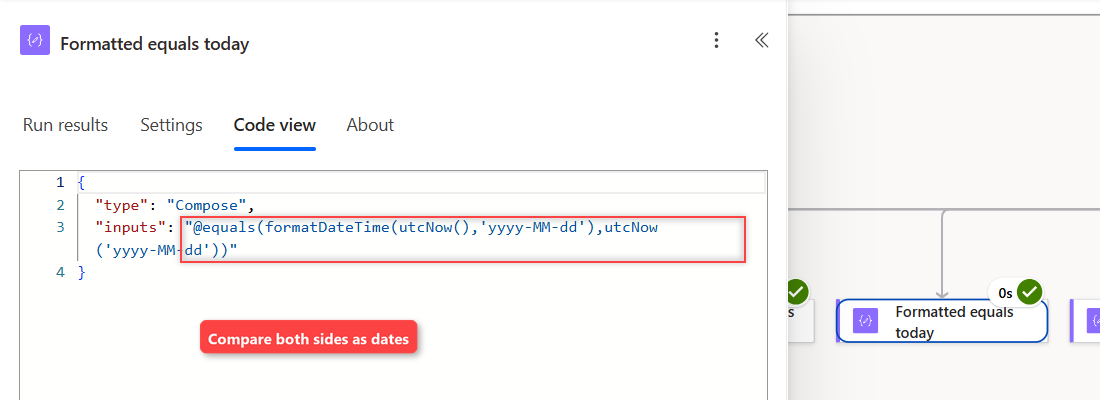
The fourth row is the easiest one to miss. Those two strings mean the same date, but equals() compares text. Here’s my reference on formatDateTime() patterns.
Which Time Zone Is “Today” in Your Flow?
If your team is in the US, UTC changes the date in the evening. A timestamp of 2026-11-11T02:30:00Z gave me two different days:
formatDateTime('2026-11-11T02:30:00Z','yyyy-MM-dd')That returned 2026-11-11. Converting to Eastern returned the day people in New York would actually call today:
convertFromUtc('2026-11-11T02:30:00Z','Eastern Standard Time','yyyy-MM-dd')That returned 2026-11-10. So I start every date flow with one Compose action named Today_Eastern:
convertFromUtc(utcNow(),'Eastern Standard Time','yyyy-MM-dd')Then each comparison reuses that one value. You could also set a variable to today’s date if you prefer variables.
How Do You Check Each SharePoint Item in a Condition?
Here’s the list I used. It’s a date-only column named DueDate, with row 7 due today and two blank rows:
| ID | Title | DueDate |
|---|---|---|
| 1 | Ergonomic chairs – Austin office | 10/15/2026 |
| 2 | Laptop refresh – Denver sales team | blank |
| 3 | Conference room AV upgrade – Seattle | 10/20/2026 |
| 4 | Printer toner – NYC front desk | 10/09/2026 |
| 5 | Standing desks – Chicago office | blank |
| 6 | Badge printer – Boston lobby | 10/21/2026 |
| 7 | Copier lease renewal – Dallas office | 11/09/2026 (today) |
| 8 | Network switch swap – Atlanta office | 11/08/2026 (yesterday) |
| 9 | Desk phones – Phoenix call center | 11/10/2026 (tomorrow) |
| 10 | Safety signage – Miami warehouse | 11/16/2026 |
- Create an instant flow with Manually trigger a flow.
- Add the
Today_EasternCompose action shown above. - Add SharePoint Get items and choose your site and list.
- Add Apply to each over the Get items value.
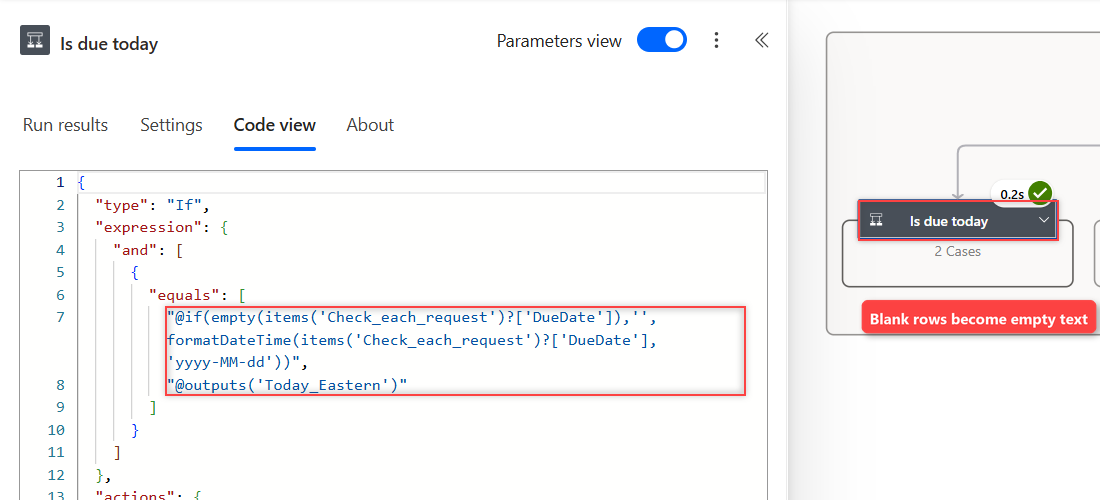
- Inside it, add a Condition. Click the left box, type /, choose Insert expression, and paste the expression below.
- Keep is equal to, and put
outputs('Today_Eastern')on the right.
if(empty(items('Check_each_request')?['DueDate']),'',formatDateTime(items('Check_each_request')?['DueDate'],'yyyy-MM-dd'))Only row 7, the Dallas copier lease, went down the Yes branch. If you only need the count, a loop is overkill, and the next section is faster.
How Do You Filter Today’s Items Without a Loop?
Use a Filter array action on the Get items value, in advanced mode:
@equals(if(empty(item()?['DueDate']),'',formatDateTime(item()?['DueDate'],'yyyy-MM-dd')),outputs('Today_Eastern'))That returned one item, row 7, and length() confirmed a count of 1. I cover the action itself in this Filter array walkthrough.
How Do You Compare Two Timestamps by Day?
Date and time columns need a different mindset, because two values on the same day rarely match to the second. I reach for startOfDay() there, since it resets a timestamp to midnight:
equals(startOfDay('2026-11-10T15:45:00Z'),startOfDay('2026-11-10T01:00:00Z'))That returned true, even though the times are almost 15 hours apart. Keep in mind that midnight here is UTC midnight, so convert first if a value sits near the edge of the day for your team.
Here’s why that matters. An item from 9:30 PM Eastern already carries the next day’s date in UTC, so converting both sides to the same local zone keeps it on the right day.
Why Does the SharePoint eq Filter Return Nothing?
Here’s the surprise from my run. The obvious Filter Query returned zero rows, even with row 7 due that very day:
DueDate eq '@{outputs('Today_Eastern')}'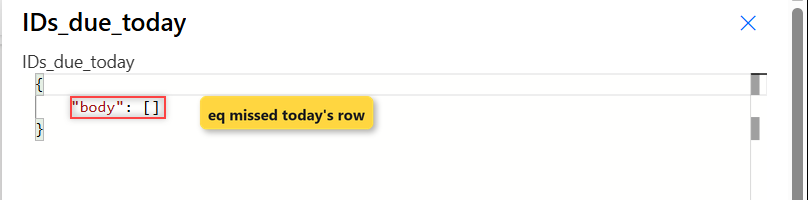
A one-day range worked. Ask for dates from today up to, but not including, tomorrow:
DueDate ge '@{outputs('Today_Eastern')}' and DueDate lt '@{addDays(outputs('Today_Eastern'),1,'yyyy-MM-dd')}'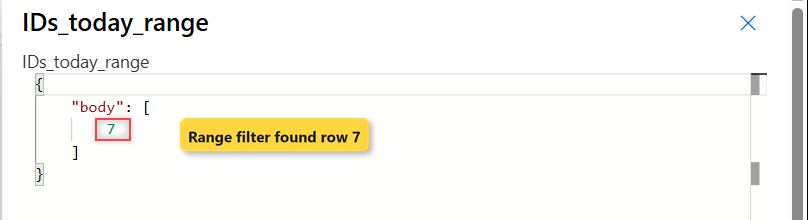
If a filter is new to you, start with Get items filter query examples. It’s cheaper than pulling every row into the flow.
Common Errors and How to Fix Them
The first failure you’ll probably meet is a blank date. Without the if(empty()) guard, my Filter array failed on row 2:
The template language function 'formatDateTime' expects its first parameter to be of type string. The provided value is of type 'Null'.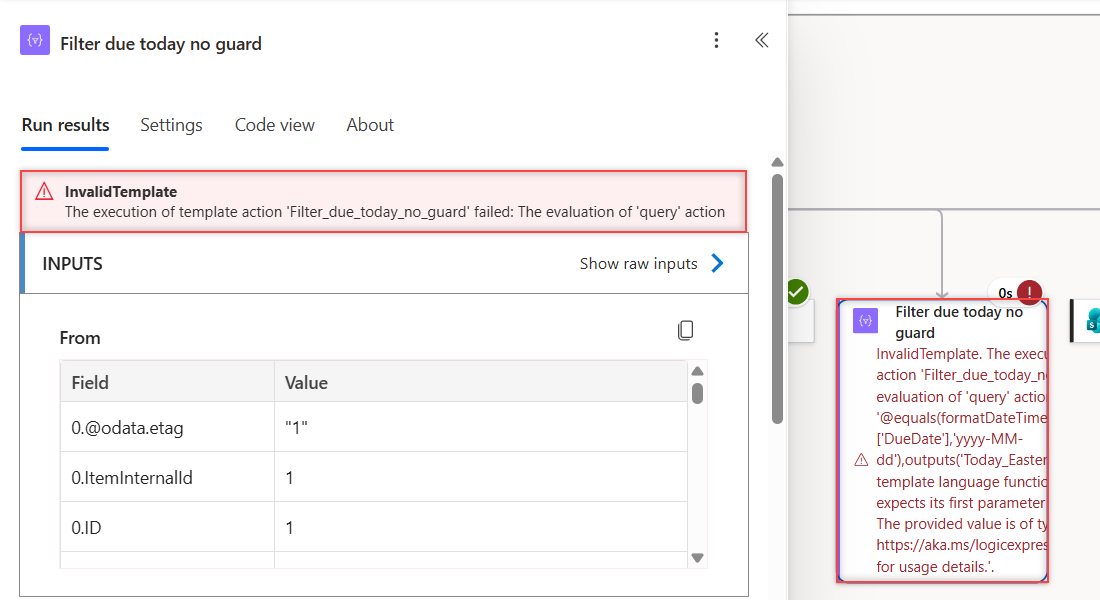
One blank row fails the whole action, not just that row. Add the guard shown above, or see how to check if a date field is empty.
- Always false? Check that both sides use the identical format string.
- Right date, wrong evening? You’re comparing in UTC. Use
convertFromUtc(). - Scheduled flow? Pick a run time well after midnight in your time zone.
Which Check Should You Use?
| Goal | My pick |
|---|---|
| Branch on one date | Condition with formatted dates |
| Find today’s items in SharePoint | Filter Query with ge and lt |
| Check an array already in the flow | Filter array with a blank guard |
| Compare two timestamps by day | startOfDay() on both |
For related date math, see my notes on the expression for yesterday’s date and the date difference in days.
Frequently Asked Questions
How do I check if a date is today in Power Automate?
Format both values the same way and compare with equals(), using yyyy-MM-dd for each side.
Why does my date equal check always return false?
A raw utcNow() includes the time. Format it first, or compare with startOfDay() on both sides.
Does utcNow() use my local time zone?
No, it returns UTC. Use convertFromUtc(), covered in the expression functions reference, to get a local date.
How do I get SharePoint items due today?
In Get items, filter with DueDate ge 'today' and DueDate lt 'tomorrow', built from formatted expressions.
What happens when the date is blank?
formatDateTime() fails with a Null type error. Wrap it in if(empty(x), '', ...).
More Power Automate Tutorials
These pair well with a daily date check:
- sending results in an HTML table
- moving dates with addDays()
- filtering runs with trigger conditions
- testing for blank values

Bijay Kumar is a 13-times Microsoft MVP in Business Applications with over 18 years of experience in the IT industry, recognized for his contributions to the Microsoft community. He is the Founder of TSinfo Technologies and shares practical, tested tutorials on Power Apps, Power Automate, Copilot Studio, and Power BI here on Power Platform FAQs. Read more.