
A blank due date shouldn’t take down your whole flow. Yet one empty row can stop a formatDateTime() call cold.
Quick answer: To make a Power Automate check if date field is empty, use empty(item()?['DueDate']). It returns true for a blank SharePoint date. To query blanks on the server, use the filter DueDate eq null.
In this tutorial, we’ll cover the Power Automate check if date field is empty pattern in a Condition, a Filter array, and a Get items query. We ran every example on November 9, 2026.
What You Need Before You Start
- A Power Automate license that includes the SharePoint connector.
- A SharePoint list with a date column. Ours is Customer Requests, with a date-only column named DueDate.
- One or two rows with no date, so you can see the blank path run.
| ID | Title | DueDate |
|---|---|---|
| 1 | Ergonomic chairs – Austin office | 10/15/2026 |
| 2 | Laptop refresh – Denver sales team | blank |
| 3 | Conference room AV upgrade – Seattle | 10/20/2026 |
| 4 | Printer toner – NYC front desk | 10/09/2026 |
| 5 | Standing desks – Chicago office | blank |
| 6 | Badge printer – Boston lobby | 10/21/2026 |
| 7 | Copier lease renewal – Dallas office | 11/09/2026 (today) |
| 8 | Network switch swap – Atlanta office | 11/08/2026 (yesterday) |
| 9 | Desk phones – Phoenix call center | 11/10/2026 (tomorrow) |
| 10 | Safety signage – Miami warehouse | 11/16/2026 |
Rows 2 and 5 are the blanks. New to column checks? We walk through the basics of a Power Automate condition for blank values separately.
Step 1: Get the List Items
- Create an Instant cloud flow with Manually trigger a flow.
- Add the SharePoint Get items action.
- Pick your Site Address and List Name.
- Save the flow.
The connector returned our date-only values as plain text like 2026-10-15. Blank dates came back as null, which matters for the next steps. You can review more Get items filter query examples if your list is large.
Step 2: Add a Condition That Tests the Date
Inside an Apply to each on the Get items value, add a Condition. Click the left box, type /, choose Insert expression, and paste this:
empty(items('Check_each_request')?['DueDate'])Set the operator to is equal to, and type the expression true on the right. Your loop name replaces Check_each_request.
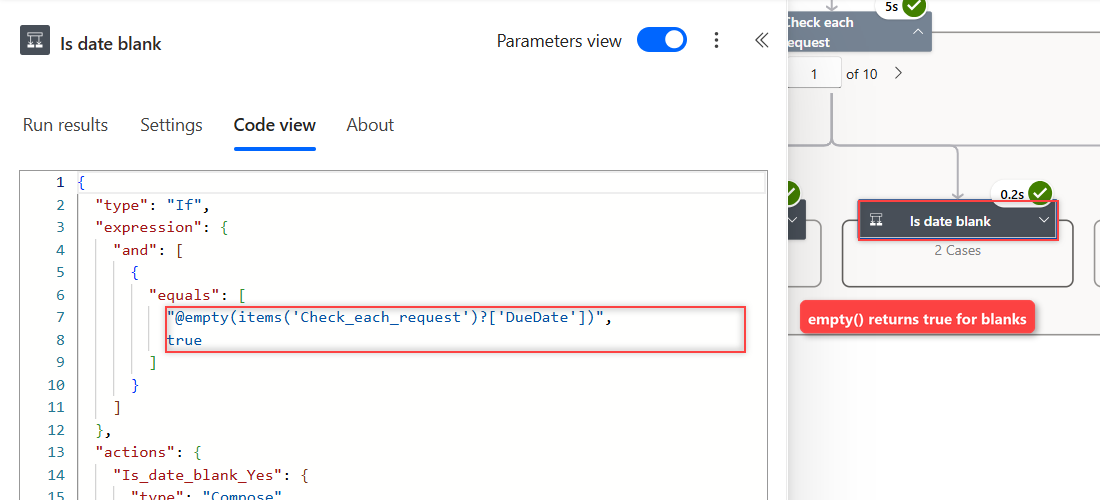
{
  "type": "If",
  "expression": {
    "and": [
      { "equals": [ "@empty(items('Check_each_request')?['DueDate'])", true ] }
    ]
  }
}
In our run, the Yes branch ran for rows 2 and 5. Use that branch to skip the row or set a variable with a default value.
Step 3: Format the Date Safely
Don’t call formatDateTime() directly on a date that might be blank. It failed in our test with this error:
The template language function 'formatDateTime' expects its first parameter to be of type string. The provided value is of type 'Null'.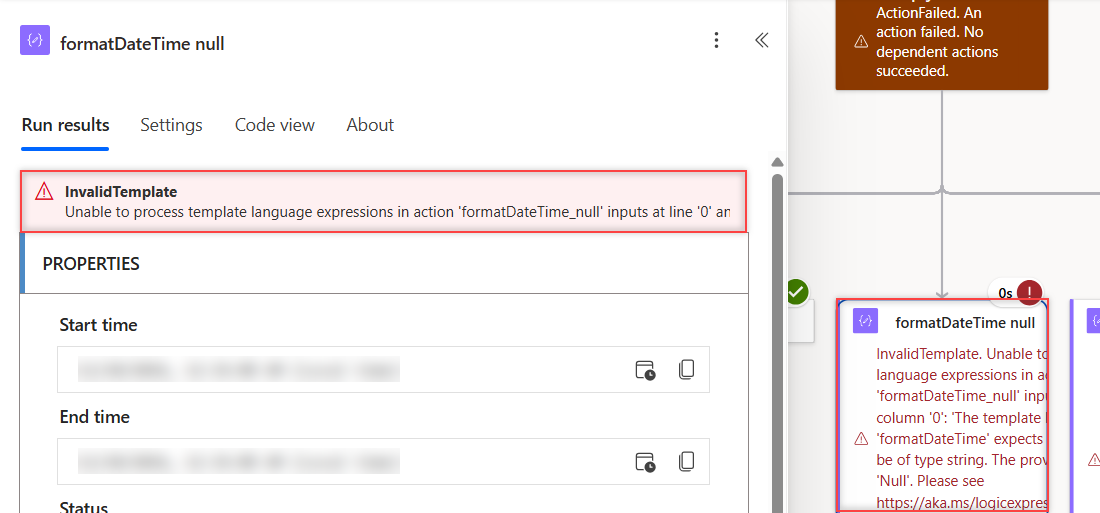
Guard it with if(). The function only evaluates the branch it returns, so the format never runs on a blank:
if(empty(item()?['DueDate']),'No due date',formatDateTime(item()?['DueDate'],'MM/dd/yyyy'))Our rows returned 10/15/2026 for row 1 and No due date for row 2. Check other patterns in our guide to formatDateTime() in Power Automate.
Step 4: Filter Blank Dates in Get Items
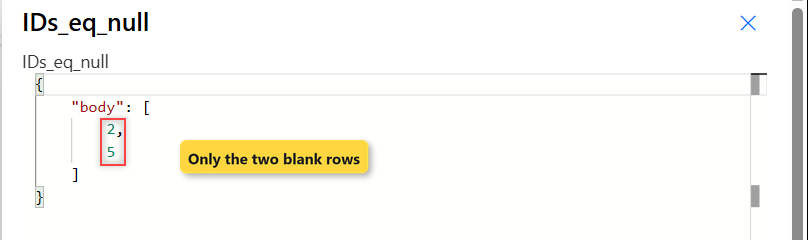
When you only want blank rows, make SharePoint do the work. Open Advanced parameters on Get items, show Filter Query, and enter this:
DueDate eq null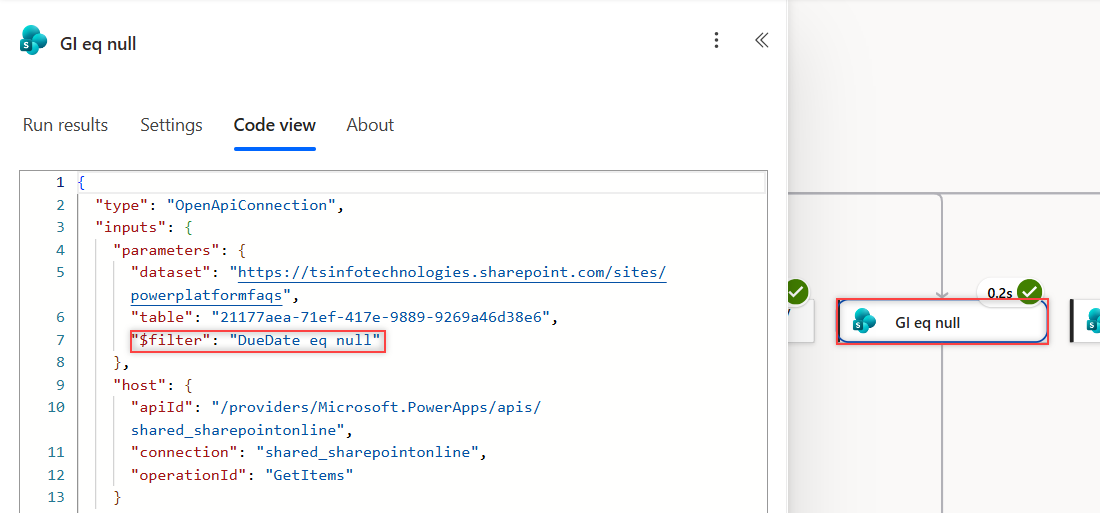
Our query returned exactly rows 2 and 5. Swapping in DueDate ne null returned the other eight rows.
Step 5: Flag Blank Dates in a Select Action
Sometimes you want every row, plus a marker that says which ones are blank. Add a Select action, set From to the Get items value, and map these columns:
| Column | Expression |
|---|---|
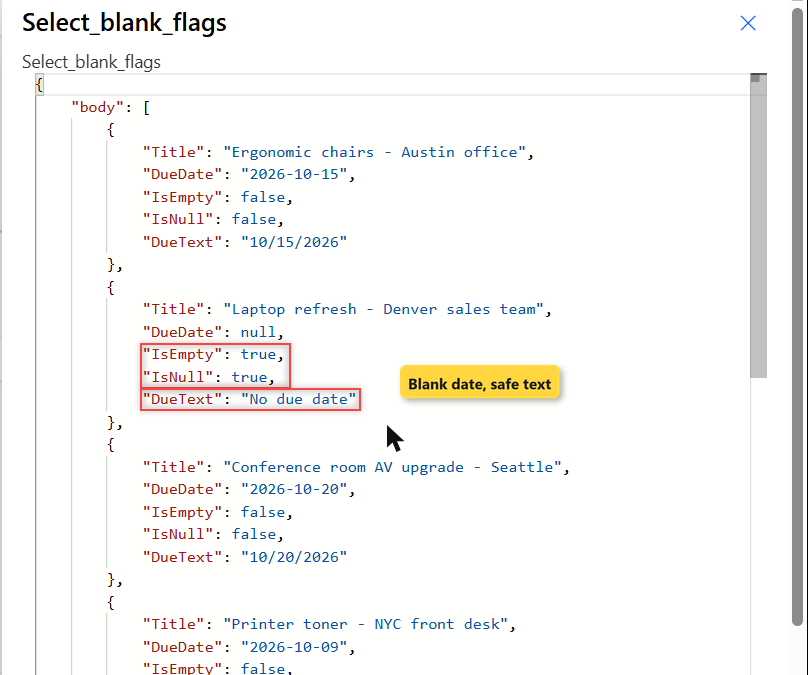
| IsEmpty | empty(item()?['DueDate']) |
| IsNull | equals(item()?['DueDate'],null) |
| DueText | if(empty(item()?['DueDate']),'No due date',formatDateTime(item()?['DueDate'],'MM/dd/yyyy')) |
Rows 2 and 5 returned true for both flags, and every other row returned false. The screenshot at the top of this post shows that output for row 2.
The Filter array action gives you the same two rows when you need only the blanks. Use empty(item()?['DueDate']) in advanced mode, then read the count with length(body('Filter_blank_dates')). Ours returned 2.
We prefer the Filter Query from Step 4 on big lists, because SharePoint sends back fewer rows. Filter array makes more sense when the items are already in the flow for another reason.
Which one you pick also depends on what happens next. If each blank needs a follow-up email, a loop over the filtered rows keeps that logic easy to read.
empty() Cheat Sheet
Here’s what each check returned in our run:
| Check | Result |
|---|---|
empty('') | true |
empty(null) | true |
empty(' ') | false (a space isn’t empty) |
empty('2026-11-10') | false |
equals(null, null) | true |
equals('', null) | false |
Missing JSON field with empty() | true |
coalesce(null, 'No due date') | No due date |
coalesce('', 'No due date') | empty text |
Filter array equals(DueDate, '') | 0 rows |
Filter array equals(DueDate, null) | rows 2 and 5 |
We use empty() because it caught both null and empty text. Pair it with the next action when you filter an array in Power Automate.
Common Mistakes to Avoid
- Comparing a SharePoint date to empty text.
equals(item()?['DueDate'],'')found zero rows because blanks arrive as null. - Filtering with empty quotes.
DueDate eq ''failed with “String was not recognized as a valid DateTime.” Usenull. - Using coalesce for empty text.
coalesce('','No due date')returned the empty text, because empty isn’t null. - Passing a blank to other functions.
length(null)andticks(null)both failed in our run. Check first withempty(). - Formatting an empty string.
formatDateTime('', ...)reported that the value must match ISO 8601.
Does This Work With Microsoft Forms Dates?
We only tested SharePoint date columns here. A Forms or Excel value may arrive differently, so add a Compose action, run the flow once, and read the raw output before you choose between null and empty text.
Next Steps
Once blanks are handled, you can safely calculate with the date. Our next stop is working out the date difference in days.
Once you know a date field has a value, a common next check is whether it fell on yesterday. I walk through that in my post on getting yesterday’s date in Power Automate, including a filter for SharePoint items that were due yesterday.
Frequently Asked Questions
How do I check if a date is empty in Power Automate?
Use empty(your_date) in a Condition or Compose action. It returned true for both null and empty text in our test.
Why does formatDateTime fail on a blank date?
A blank SharePoint date arrives as null, and the function requires a string. Guard it with if(empty(x), '', formatDateTime(x, ...)).
How do I filter SharePoint items with no date?
Use DueDate eq null in the Get items Filter Query. The SharePoint connector reference lists the action’s OData filter option.
Is null the same as empty in Power Automate?
No. empty() treats both as empty, but equals('', null) returned false in our run.
Does empty() work on a space?
It returns false for a single space, so trim user-entered text before you test it.
More Power Automate Tutorials
We keep these close whenever a flow handles missing data:
- adding days to a date
- using trigger conditions to skip runs
- validating JSON with Parse JSON
- storing today’s date in a variable

Bijay Kumar is a 13-times Microsoft MVP in Business Applications with over 18 years of experience in the IT industry, recognized for his contributions to the Microsoft community. He is the Founder of TSinfo Technologies and shares practical, tested tutorials on Power Apps, Power Automate, Copilot Studio, and Power BI here on Power Platform FAQs. Read more.