
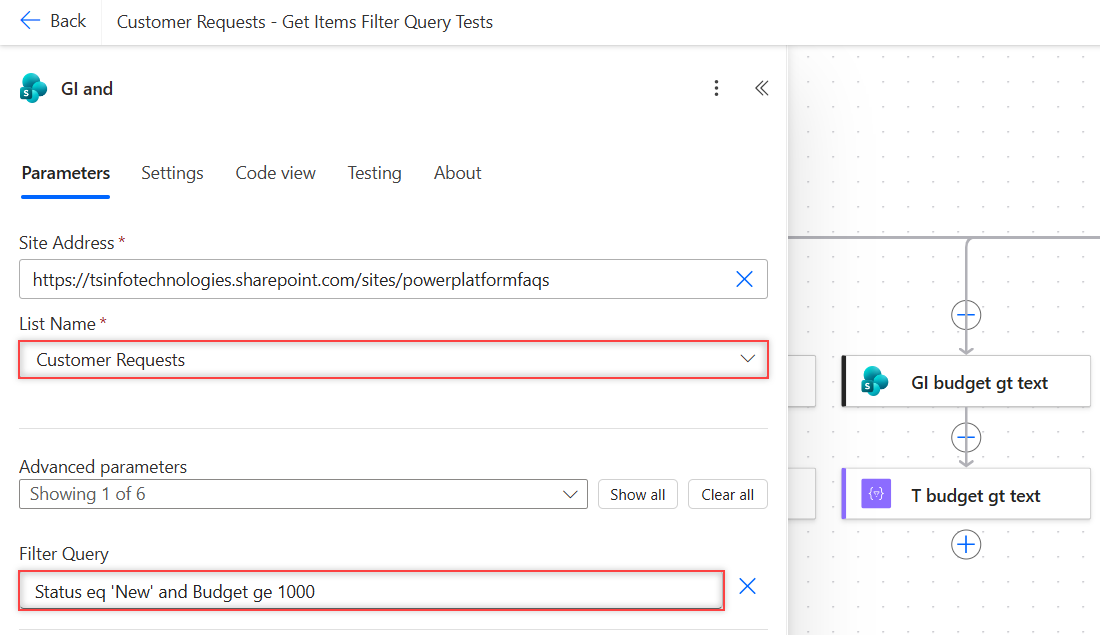
A get items filter query tells SharePoint which list items to send back, so the flow never loads the rest. In the Get items action, open Filter Query and type something like Status eq 'New' and Budget ge 1000.
In this tutorial, we’ll write filters for text, choice, number, date, blank, and person columns, combine them, sort and limit results, and decode the errors. I ran 21 queries against a real list in October 2026.
What List Does This Tutorial Use?
A SharePoint list named Customer Requests with six items. Status is a choice column, Budget is currency, DueDate is date-only, and AssignedTo is a person column. Some fields are blank on purpose:
| ID | Title | Status | Budget | DueDate | |
|---|---|---|---|---|---|
| 1 | Ergonomic chairs – Austin office | New | $1,250 | 10/15/2026 | yes |
| 2 | Laptop refresh – Denver sales team | In Progress | $4,800 | blank | blank |
| 3 | Conference room AV upgrade – Seattle | blank | blank | 10/20/2026 | yes |
| 4 | Printer toner – NYC front desk | Closed | $320 | 10/9/2026 | yes |
| 5 | Standing desks – Chicago office | New | $2,100 | blank | blank |
| 6 | Badge printer – Boston lobby | New | $650 | 10/21/2026 | yes |
Each query in this post ran in its own Get items action, followed by a Select that listed the IDs returned. To shape results like that, see the Power Automate Select action.
Where Do You Enter the Filter Query?
- In your flow, add the SharePoint Get items action.
- Pick the Site Address and List Name.
- Open Advanced parameters and turn on Filter Query. You can add Order By and Top Count from the same list.
- Type the query as plain text. Don’t use the fx expression editor for the query itself.
Microsoft Learn describes Filter Query as an ODATA filter that restricts the entries returned. OData is the query language SharePoint’s REST service understands, with operators like eq and gt.
Filtering at the source beats loading everything and filtering later. When you must filter after the fact, use Filter array in Power Automate.
How Do You Filter Text and Choice Columns?
Put text in single quotes. Status eq 'New' returned IDs 1, 5, and 6. A choice column works with its plain value, with no /Value needed in the query.
Unlike Filter array, this is case-insensitive. Status eq 'new' in lowercase returned the same three items.
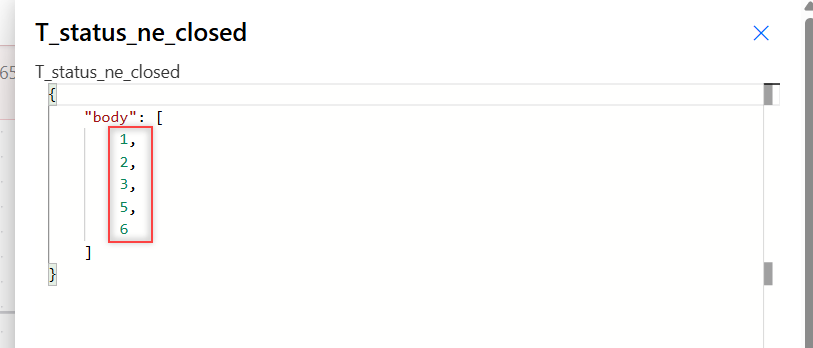
ne means not equal. Status ne 'Closed' returned 1, 2, 3, 5, and 6. Item 3, with no status at all, was included:
How Do You Filter Number and Currency Columns?
Use gt, ge, lt, or le with no quotes. Budget gt 1000 returned 1, 2, and 5.
Budget gt '1000' with quotes returned the same three in my test, but leave numbers unquoted to stay consistent. ID le 3 returned the first three items.
If the number you compare comes from text, such as a form answer, first convert the string to an integer.
How Do You Combine Conditions with And and Or?
Write and and or in lowercase between conditions:
Status eq 'New' and Budget ge 1000That returned 1 and 5. Status eq 'New' or Status eq 'Closed' returned 1, 4, 5, and 6. Use parentheses when you mix both, so the order is clear.
A filter like this runs every time the flow runs. To stop the flow from starting at all for items you don’t want, use trigger conditions in Power Automate.
How Do You Filter by Date?
Compare with a date in yyyy-MM-dd format inside single quotes. DueDate ge '2026-10-15' returned 1, 3, and 6, skipping the blank dates.
For a dynamic date like today, build it with an expression inside the text:
DueDate ge '@{formatDateTime(utcNow(), 'yyyy-MM-dd')}'On October 21, 2026, it returned only item 6. For other date math, see adding days with addDays() and formatting dates with formatDateTime().
How Do You Find Blank or Not Blank Fields?
Compare with null, without quotes. DueDate eq null and CustomerEmail eq null both returned items 2 and 5.
CustomerEmail ne null returned the other four. To check blanks after the items are loaded, see the Power Automate condition if blank guide.
How Do You Use Starts With and Contains?
startswith(Title, 'Laptop') returned item 2. For contains, SharePoint’s OData uses substringof(), with the search text first:
substringof('desk', Title)It returned items 4 and 5, front desk and Standing desks. With ‘Desk’ in uppercase, the result was the same, so these text functions ignored case too.
How Do You Filter a Person Column?
Add a slash and the person field to read. This matched the display name:
AssignedTo/Title eq 'Bijay Kumar [Microsoft MVP]'It returned 1, 3, and 4, the three items assigned to that person, with no extra settings in the action.
To act on each matching item, loop over the value output with Apply to each.
How Do You Sort and Limit the Results?
Use Order By and Top Count next to Filter Query. With Order By set to Budget desc and Top Count 2, I got item 2 ($4,800) and item 5 ($2,100).
Microsoft Learn lists the Top Count default as all entries. To count what comes back, see how to count items in an array.
Why Does My Get Items Filter Query Fail?
Three mistakes failed with BadRequest. A misspelled column name:
Column 'Statuss' does not exist. It may have been deleted by another user.A display name with a space instead of the internal name. My column shows as Customer Email, but its internal name is CustomerEmail:
The expression "Customer Email eq 'tom.baker@contoso.com'" is not valid. Creating query failed.Double quotes around text. OData needs single quotes:
The expression "Status eq "New"" is not valid. Creating query failed.To find a column’s internal name, open the list settings, select the column, and read the end of the URL after Field=.
What Happened in My Tests?
| Filter Query | IDs returned |
|---|---|
Status eq 'New' | 1, 5, 6 |
Status eq 'new' | 1, 5, 6 |
Status ne 'Closed' | 1, 2, 3, 5, 6 |
Budget gt 1000 | 1, 2, 5 |
Status eq 'New' and Budget ge 1000 | 1, 5 |
Status eq 'New' or Status eq 'Closed' | 1, 4, 5, 6 |
DueDate ge '2026-10-15' | 1, 3, 6 |
DueDate eq null | 2, 5 |
CustomerEmail ne null | 1, 3, 4, 6 |
startswith(Title, 'Laptop') | 2 |
substringof('desk', Title) | 4, 5 |
AssignedTo/Title eq '...' | 1, 3, 4 |
ID le 3 | 1, 2, 3 |
Statuss eq 'New' | Failed: column does not exist |
Get Items Filter Query: Cheat Sheet
| Goal | Filter Query |
|---|---|
| Equals text or choice | Status eq 'New' |
| Not equal | Status ne 'Closed' |
| Greater than a number | Budget gt 1000 |
| Both | A eq 'x' and B ge 5 |
| Either | A eq 'x' or A eq 'y' |
| On or after a date | DueDate ge '2026-10-15' |
| Blank | DueDate eq null |
| Starts with | startswith(Title, 'Laptop') |
| Contains | substringof('desk', Title) |
| Person | AssignedTo/Title eq 'Name' |
For more Power Automate patterns, the Power Automate tutorials hub lists every post in order.
Frequently Asked Questions
How do I filter SharePoint items in Power Automate Get items?
Open Advanced parameters in Get items, turn on Filter Query, and type an OData filter such as Status eq ‘New’. Use the column’s internal name and single quotes around text.
Is the Get items filter query case-sensitive?
Not in my tests. Status eq ‘new’ returned the same items as ‘New’, and substringof() matched ‘desk’ and ‘Desk’ the same way.
How do I filter for blank values in Get items?
Compare the column with null, without quotes: DueDate eq null. Use ne null to get items where the field has a value.
Why does Get items say the column does not exist?
The name is misspelled, or it’s the display name instead of the internal name. Check the internal name in the list settings URL after Field=.
What does Top Count do in Get items?
It limits how many items come back. The SharePoint connector reference on Microsoft Learn lists the default as all entries.
More Power Automate Tutorials
These posts build on Get items:
- building an HTML table from list items
- using the Set variable action
- creating a file in SharePoint
- creating an array in Power Automate

Bijay Kumar is a 13-times Microsoft MVP in Business Applications with over 18 years of experience in the IT industry, recognized for his contributions to the Microsoft community. He is the Founder of TSinfo Technologies and shares practical, tested tutorials on Power Apps, Power Automate, Copilot Studio, and Power BI here on Power Platform FAQs. Read more.