
Our facilities team wanted a follow-up date three months after every request’s due date, so nobody forgets to check the new chairs or the copier lease. To do a Power Automate add months to date, use addToTime(date, 3, 'Month', 'yyyy-MM-dd'). There’s no addMonths() function.
In this tutorial, I’ll build that flow with you step by step: Power Automate add months to date for every row in a SharePoint list, plus a filter for items due in the next month. I ran every step on November 9, 2026.
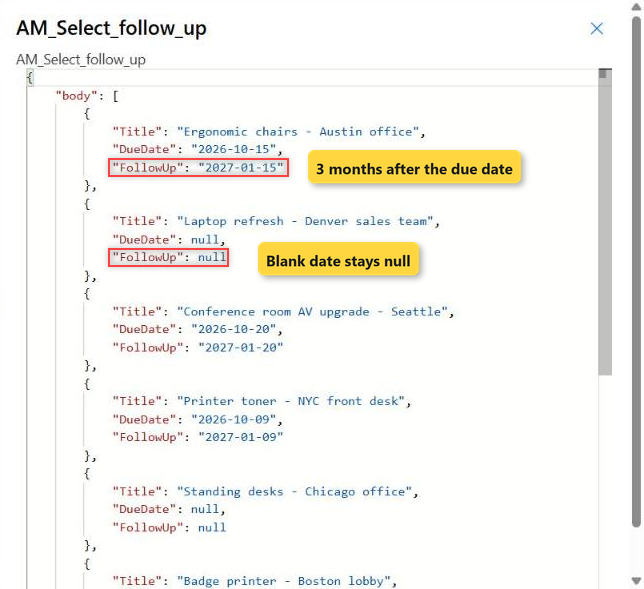
Here’s what we’re building. Each request gets a FollowUp date, and blank due dates stay blank instead of breaking the flow:
- Today_Eastern – a Compose action that holds today’s date in Eastern time
- Get items – reads the Customer Requests list
- Select – adds a FollowUp column with
addToTime() - Get items with a filter – finds requests due within the next month
Before You Start
You need a Power Automate license that includes the SharePoint connector, and edit access to a list. I used my Customer Requests list with a date-only DueDate column. Two rows are blank on purpose.
| Column | Type | Notes |
|---|---|---|
| Title | Single line of text | Request name |
| DueDate | Date only | Blank in rows 2 and 5 |
| Status | Choice | New, In Progress, Closed |
| ID | Title | DueDate |
|---|---|---|
| 1 | Ergonomic chairs – Austin office | 10/15/2026 |
| 2 | Laptop refresh – Denver sales team | blank |
| 3 | Conference room AV upgrade – Seattle | 10/20/2026 |
| 4 | Printer toner – NYC front desk | 10/09/2026 |
| 5 | Standing desks – Chicago office | blank |
| 6 | Badge printer – Boston lobby | 10/21/2026 |
| 7 | Copier lease renewal – Dallas office | 11/09/2026 |
| 8 | Network switch swap – Atlanta office | 11/08/2026 |
| 9 | Desk phones – Phoenix call center | 11/10/2026 |
| 10 | Safety signage – Miami warehouse | 11/16/2026 |
| 11 | Projector bulbs – Portland office | 11/12/2026 |
If you haven’t read list rows in a flow before, start with this Get items filter query guide.
Step 1: Store Today’s Date in Eastern Time
utcNow() returns UTC, which runs four or five hours ahead of the East Coast. I ran this flow at 7:24 PM Eastern on November 9, and utcNow() already said November 10.
- Create an instant flow with Manually trigger a flow.
- Add a Compose action and rename it Today_Eastern.
- Click Inputs, type /, choose Insert expression, paste the expression below, and select Add.
convertFromUtc(utcNow(),'Eastern Standard Time','yyyy-MM-dd')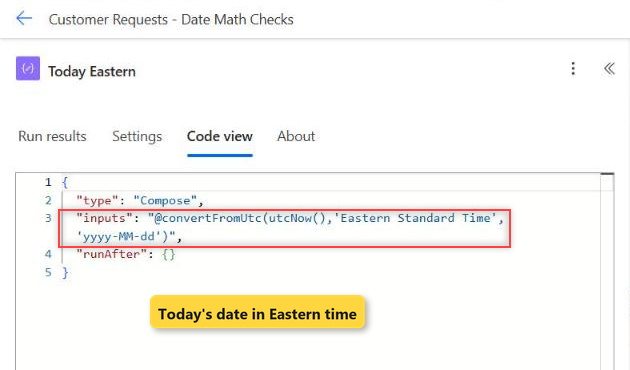
Checkpoint: In a test run, Today_Eastern returned 2026-11-09. The same moment in UTC was 2026-11-10T00:24Z. More on this in setting a variable to today’s date.
Step 2: Add Months With addToTime()
Before touching the list, test the expression on a fixed date. Add another Compose action and insert this expression:
addToTime('2026-11-10',3,'Month','yyyy-MM-dd')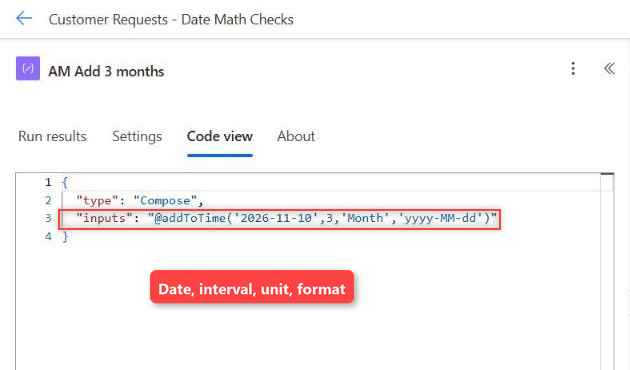
Checkpoint: It returned 2027-02-10. The unit is the third argument, and Microsoft lists Second, Minute, Hour, Day, Week, Month, and Year.
Leave out the format and you get a full timestamp, 2026-12-10T00:00:00.0000000, for one month. Use 'MM/dd/yyyy' for 12/10/2026, the same patterns as formatDateTime().
Step 3: Add a FollowUp Column for Every Request
Same list, now with a follow-up date on each row. Add Get items, pick your site and list, then add a Select action.
- Set From to the Get items value.
- Map Title and DueDate from the dynamic content.
- Add a key named FollowUp and insert this expression as its value:
if(empty(item()?['DueDate']),null,addToTime(item()?['DueDate'],3,'Month','yyyy-MM-dd'))The if(empty(...)) part matters. addToTime(null,1,'Month') failed in my run because the first parameter has to be a string. See how the Select action reshapes rows.
Checkpoint: Row 1 (due 10/15/2026) returned 2027-01-15, row 7 (11/09/2026) returned 2027-02-09, and both blank rows returned null.
Step 4: Find Requests Due in the Next Month
Now flip it around. Instead of computing dates, ask SharePoint for rows due between today and one month from today. In a second Get items action, open Advanced parameters, choose Filter Query, and enter:
DueDate ge '@{outputs('Today_Eastern')}' and DueDate lt '@{addToTime(outputs('Today_Eastern'),1,'Month','yyyy-MM-dd')}'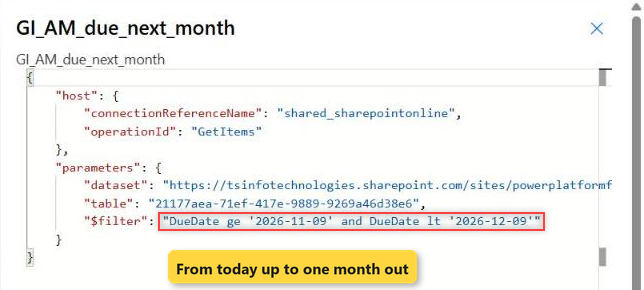
Checkpoint: It returned rows 7, 9, 10, and 11. Row 7 is due today, and nothing from October came back. I use ge plus lt on purpose, as explained in filtering dates less than today.
Test the Flow
Save, then select Test, Manually, and Run flow. Open the run and click each action to read its outputs. Here’s what my run returned for the tricky month-end dates:
| Expression | Result |
|---|---|
addToTime('2026-01-31',1,'Month','yyyy-MM-dd') | 2026-02-28 |
addToTime('2028-01-31',1,'Month','yyyy-MM-dd') | 2028-02-29 (leap year) |
addToTime('2026-03-31',-1,'Month','yyyy-MM-dd') | 2026-02-28 |
subtractFromTime('2026-11-10',2,'Month','yyyy-MM-dd') | 2026-09-10 |
addDays('2026-01-31',30,'yyyy-MM-dd') | 2026-03-02 |
addToTime('2028-02-29',12,'Month','yyyy-MM-dd') | 2029-02-28 |
addToTime('2026-11-10T15:30:00Z',1,'Month') | 2026-12-10T15:30:00.0000000Z |
So January 31 plus one month lands on the last day of February, not March 2 or 3. That’s why I never fake months with addDays(30): it gave March 2 for the same start date.
Variations You’ll Need
Subtract months
Pass a negative number to addToTime(), or use subtractFromTime() with a positive one. Both worked. For day math, use addDays().
First and last day of next month
Combine startOfMonth() with addToTime(). These returned 2026-12-01 and 2026-12-31:
addToTime(startOfMonth('2026-11-10'),1,'Month','yyyy-MM-dd')
addDays(addToTime(startOfMonth('2026-11-10'),2,'Month'),-1,'yyyy-MM-dd')
Months from a number column
The interval must be an integer. If the number of months comes in as text, wrap it in int(); int('3') worked, the same way you convert a string to an integer.
Troubleshooting
These are the errors I hit on purpose in the test run.
| Problem | Fix |
|---|---|
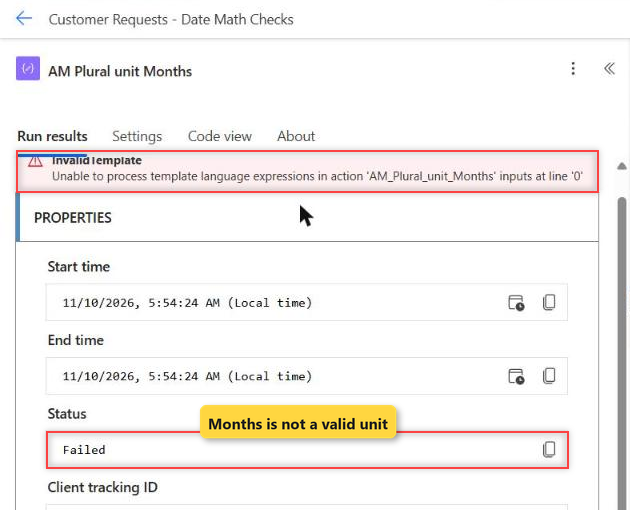
'Months' (plural) – not a valid time unit | Use 'Month'. Lowercase 'month' worked too |
1.5 – expects an integer, got Float | Whole months only; use addDays for the rest |
'3' – expects an integer, got String | Wrap it: int('3') |
null date – got type Null | Guard with if(empty(...)) |
The template language function 'addToTime' expects its second parameter to be a string that represents a valid time unit. The provided value 'Months' is not a valid time unit.Note: the message says “second parameter” even though the unit is the third argument. Don’t let that send you hunting in the wrong place.
Where to Take It Next
- Write the FollowUp date back with Update item inside a loop, as in this Apply to each walkthrough.
- Email the next-month list as a table with Create HTML table.
- Run it on a schedule and skip empty runs with trigger conditions.
Frequently Asked Questions
How do I add months to a date in Power Automate?
Use addToTime(date, number, 'Month', 'yyyy-MM-dd'). For example, addToTime('2026-11-10',3,'Month','yyyy-MM-dd') returns 2027-02-10.
Is there an addMonths function in Power Automate?
No. Power Automate has addDays(), addHours(), and addMinutes(), but months and years go through addToTime() or subtractFromTime(). See the Microsoft expression functions reference.
What happens when I add one month to January 31?
It returns the last day of February: 2026-02-28 in a normal year and 2028-02-29 in a leap year.
How do I subtract months from a date?
Use a negative interval, such as addToTime(date,-2,'Month'), or subtractFromTime(date,2,'Month').
Why does addToTime fail on a blank SharePoint date?
A blank date arrives as null, and addToTime needs a string. Wrap it in if(empty(date), null, addToTime(...)).
More Date Tutorials
Once months work, these are the date tricks people usually need next:
- getting yesterday’s date
- counting days between two dates
- checking if a date field is empty
- checking if a date is today

Bijay Kumar is a 13-times Microsoft MVP in Business Applications with over 18 years of experience in the IT industry, recognized for his contributions to the Microsoft community. He is the Founder of TSinfo Technologies and shares practical, tested tutorials on Power Apps, Power Automate, Copilot Studio, and Power BI here on Power Platform FAQs. Read more.